Etsy bulk upload: the fast guide for digital sellers

Etsy bulk upload: the fast guide for digital sellers
What Etsy bulk upload actually does (and what it can’t)
Etsy does not have a native bulk upload for creating new listings. Every new product requires a third-party tool that connects to your shop via Etsy’s API and accepts a formatted CSV file. That’s the core reality every seller needs to understand before they start.
What Etsy does offer natively is its Quick Edit tool for updating existing listings: price, quantity, tags, shipping profiles, and renewal options. However, titles, descriptions, and photos require separate edits or a CSV re-upload.
Here’s what a bulk upload via CSV covers:
- Title — max 140 characters, plain language, no keyword stuffing
- Description — plain text only, no HTML (Etsy strips it)
- Price — numeric, in your shop currency
- Tags — up to 13, each max 20 characters
- Quantity and SKU — for inventory tracking
- Who Made It / When Made It — required Etsy metadata fields
- Image URLs — must be publicly accessible links
- Variations — two types per listing, all values in one row
One important limitation: uploading a moderate batch of listings via CSV takes significantly less time than manual entry. Variation-specific pricing must be adjusted manually in Etsy after completing the CSV upload.
Table of Contents
- How to prepare your CSV for a smooth Etsy listing bulk upload
- Common mistakes that break bulk uploads
- How to scale your Etsy listings with automation and AI
- Step-by-step: the full Etsy bulk upload process
- Handling images in bulk uploads
- Troubleshooting common Etsy bulk upload errors
- Advanced planner designer makes bulk listing faster for digital creators
- Key takeaways
How to prepare your CSV for a smooth Etsy listing bulk upload
Getting your data right before you upload saves hours of troubleshooting. Here’s the workflow:
- Download Etsy’s official CSV template from Shop Manager → Listings → Import new listings
- Open it in Excel, Google Sheets, or Numbers — each row is one listing
- Write SEO-aware titles naturally; Etsy penalises keyword stuffing
- Keep descriptions in plain text; strip any HTML before you paste
- Add your 13 tags carefully — each must be under 20 characters
- Use exact Etsy taxonomy paths for categories (copy them from an existing listing)
- Match shipping profile names exactly as they appear in your Shop Manager
- Assign a consistent SKU to every product for easier inventory management later
- For variations, list all values in a single row using the Variation Name / Variation Values columns
Pro Tip: Test every new CSV with a batch of 3–5 listings first. Catching a formatting error across five rows is manageable; catching it across 100 is not.
For images, every URL must be publicly hosted. Private links cause upload failures on a per-listing basis, which means fixing them one by one. Host your mockup and product images on a reliable cloud service — Google Drive (with public sharing on), Dropbox, or Imgur all work. Consistent SKU conventions also make bulk edits far easier down the track.
Common mistakes that break bulk uploads
Most upload errors come down to a handful of repeatable problems:
Broken image URLs. A private or expired link fails silently on that listing. Always test your image links in an incognito browser tab before uploading.

HTML in descriptions. Etsy strips it, which can corrupt your formatting or leave stray characters. Write in plain text from the start.
Tag length violations. A tag over 20 characters will reject the entire row. Count characters before you finalise.
Mismatched shipping profile names. Even one extra space causes a mismatch. Copy-paste directly from Shop Manager.
Skipping the error report. When Etsy flags issues, it generates a downloadable error file. Read it line by line rather than guessing what went wrong.
New shops should also keep initial batches small. Daily listing limits and API flags can slow you down if you push hundreds of listings at once from a brand-new account.
How to scale your Etsy listings with automation and AI
Manual CSV prep works, but it has a ceiling. Once you’re creating 50+ products regularly, AI-powered tools that auto-generate SEO-optimised titles, tags, and descriptions become genuinely worth it.
The two tools built specifically for digital planner and printable sellers are worth knowing:
| Feature | Advanced Planner Designer (APD) | My Planners Hub (MPH) |
|---|---|---|
| AI optimisation | Full AI title, tag, and description generation | Not a core feature |
| Bulk upload support | Outputs upload-ready listing content | Pre-made templates to adapt |
| Product variety | Planners, covers, stickers, mockups, wallpapers, colouring books | Planner templates and digital planning resources |
| Best for | Creators building and listing original products at scale | Sellers wanting ready-made products to resell or use as inspiration |
| Ease of use | Designed for non-designers; generates complete kits | Browse and download; minimal setup |
Advanced Planner Designer is the stronger fit when you’re creating original products and need listing content generated alongside the product itself. My Planners Hub suits sellers who want a library of ready-made planners to get started without complex design work.
Step-by-step: the full Etsy bulk upload process
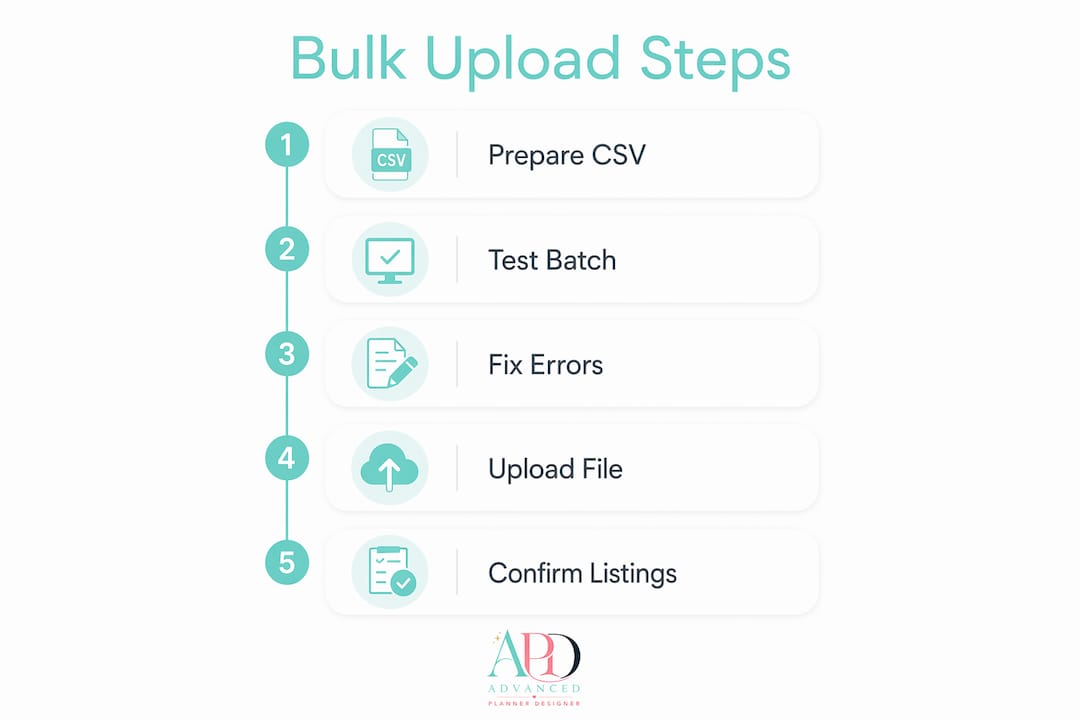
- Download the template from Shop Manager → Listings → Import new listings
- Fill your spreadsheet — one row per listing, all required fields completed
- Host your images publicly and paste the URLs into the image columns
- Save as CSV (UTF-8) — critical if you’re working in Google Sheets
- Upload the file via Shop Manager → Import new listings → Choose file
- Wait 1–5 minutes for Etsy to validate (larger files up to 10 minutes)
- Download the error report if flagged; fix issues and re-upload
- Review drafts — check titles, prices, photos, and tags in preview
- Publish individually or click “Publish all” to go live at once
Etsy processes up to 100 listings per CSV file. For larger catalogues, split into multiple batches.
Handling images in bulk uploads
Images are the trickiest part of any Etsy listing bulk upload. Etsy doesn’t let you upload image files directly via CSV — you supply URLs instead, and those URLs must be publicly accessible at the time of upload.
Key requirements:
- Up to 10 images per listing
- Minimum size: 50 × 50 pixels (recommended: at least 3,000 pixels on the longest side)
- Maximum file size: 10 MB per image
- URL must include the file extension (e.g.
.jpg,.png)
For digital planner sellers, your mockup images are often the deciding factor in whether a buyer clicks. Generate professional mockups before you build your CSV so the URLs are stable and ready to paste. Advanced Planner Designer’s AI mockup generator creates listing-ready visuals in seconds, which means your image URLs are sorted before your spreadsheet is half-finished.
Variation images need special handling. Tools like Shop Uploader can automatically link images to their corresponding variations, which Etsy’s native CSV process doesn’t do.
Troubleshooting common Etsy bulk upload errors
| Error | Likely cause | Fix |
|---|---|---|
| “Invalid image URL” | URL is private or missing file extension | Make image public; add .jpg or .png to URL |
| “Invalid tag length” | Tag exceeds 20 characters | Shorten the tag before re-uploading |
| “Missing required field” | Who Made It or When Made It left blank | Fill both fields for every row |
| “Shipping profile not found” | Name doesn’t exactly match Shop Manager | Copy-paste the profile name directly |
| File won’t upload | Saved as regular CSV, not UTF-8 | Re-save from Google Sheets as CSV (UTF-8) |
| Variations not pricing correctly | Variation price adjustments not supported in CSV | Update variation prices manually in Etsy after upload |
If Etsy’s error report doesn’t make the issue obvious, upload a single-row test file with that listing’s data. Isolating one row makes the problem visible fast.
Advanced planner designer makes bulk listing faster for digital creators
Bulk uploading is only half the job. The other half is having great products and listing content ready to go.

Advanced Planner Designer is built for exactly this. You generate a complete planner kit — pages, cover, stickers, mockups, and wallpapers — and the platform produces the listing title, tags, and description alongside it. Everything is formatted for Etsy from the start. No separate SEO research. No hunting for the right tags. No piecing together tools.
Over 10,000 creators have used APD to generate more than one million products. For Australian sellers scaling a digital planner shop, that’s a real shortcut: your AI planner generator output drops straight into your CSV template, ready to upload. Check the pricing plans and start your first kit today.
Key takeaways
Etsy bulk upload requires a third-party CSV tool — there’s no native new-listing import — but the right workflow can reduce manual entry time dramatically.
| Point | Details |
|---|---|
| No native bulk upload | Etsy requires third-party CSV tools to create new listings in bulk. |
| Time savings are real | Bulk upload tools reduce listing time by over 85%, saving sellers many hours weekly compared to manual entry. |
| CSV prep is critical | Clean data — plain text, correct tags, public image URLs — prevents most upload errors. |
| Variations need manual work | Variation-specific pricing must be adjusted in Etsy after the CSV upload completes. |
| Advanced planner designer | Generates complete planner kits with Etsy-ready listing content, cutting product creation and SEO prep to minutes. |