Mockup generator for Etsy: your complete 2026 guide
Mockup generator for Etsy: your complete 2026 guide

A mockup generator for Etsy is a tool that places your digital design onto a realistic product image, ready for your listing, without a photoshoot or Photoshop. Etsy sellers increasingly rely on these tools because buyers judge listings by their visuals before reading a single word. The standard industry term is “product mockup generator,” and it covers everything from AI-powered image creation to template-based editors. Advancedplannerdesigner has supported over 10,000 creators in generating over one million products, which shows just how central mockup creation has become to the digital product economy.
How do mockup generators for Etsy work?
A mockup generator works by layering your design onto a pre-built product template, then rendering the result as a finished image. The process has changed significantly. Early tools required Photoshop smart objects and manual layer adjustments. Modern generators do the same job in seconds using cloud-based rendering or AI.
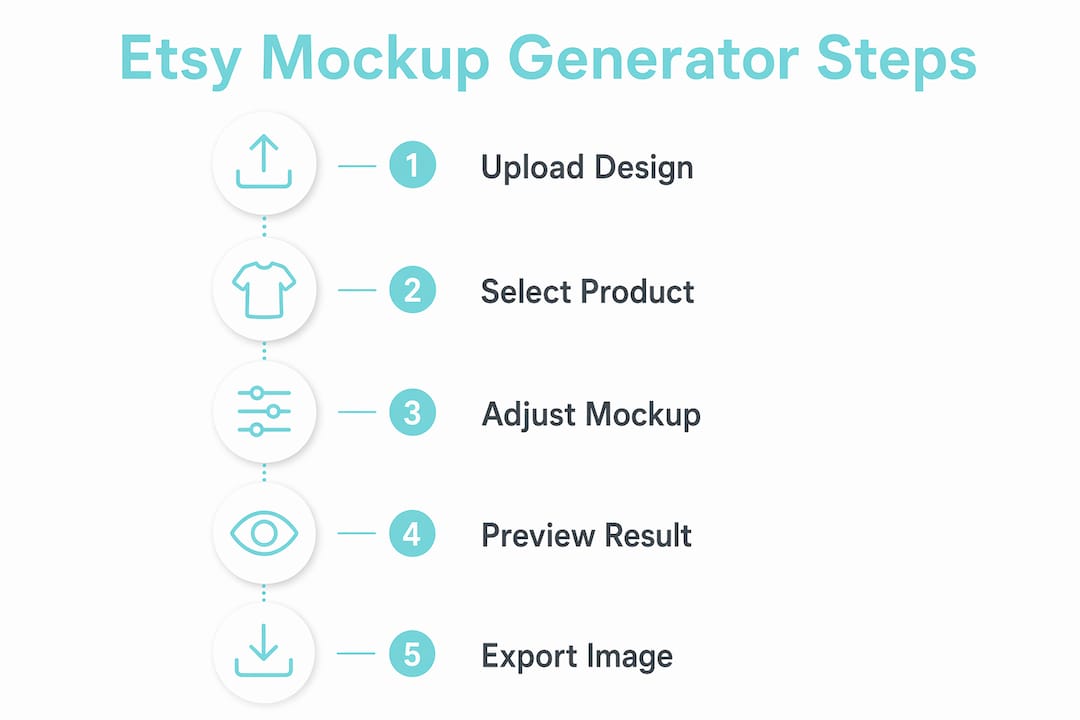
The typical workflow looks like this:
- Upload your design file. You drop in a PNG, JPG, or PDF, and the generator maps it onto the product template automatically.
- Choose a template. AI-driven platforms now offer over 27,000 templates across 60+ product types, covering everything from framed wall art to spiral notebooks and tote bags.
- Generate with AI. Some tools accept a text prompt and produce a studio-quality product image in roughly two seconds, eliminating the need for Photoshop layers or physical samples entirely.
- Use bulk generation. A bulk mockup generator creates multiple-angle variations from one design upload in under 30 seconds, which is far faster than manual editing or hiring a photographer.
- Download and list. You export the finished images at the correct resolution and upload them directly to your Etsy listing.
The efficiency gain over traditional methods is real. A Photoshop mockup generator workflow might take 20 minutes per product when you account for layer setup, perspective warping, and colour correction. AI-based tools collapse that to under a minute. For sellers managing catalogues of 50 or more products, that difference is significant.
Browser-based editors now handle perspective warping and smart object rendering in the cloud, replacing the need for complex desktop software. You get the same quality output without the subscription cost or the learning curve.

What features should Etsy sellers look for in a mockup generator?
Not every mockup tool suits every seller. The right choice depends on your product type, your volume, and how much customisation you need. These are the features that matter most.
-
Template variety and product range. A wall art mockup generator needs frames, canvas prints, and poster styles. A sticker seller needs flat lay and packaging templates. Check that the tool covers your specific product category before committing.
-
Ease of use. The best tools require no design experience. Look for drag-and-drop interfaces, automatic design placement, and one-click colour changes. If you need a tutorial to generate a single image, the tool is too complex for daily use.
-
Bulk mockup support. If you sell multiple variations of one design, bulk generation is non-negotiable. Bulk generation ensures consistent alignment and design placement across all angles, which protects your brand’s professional appearance.
-
Output resolution and format. Etsy recommends listing images of at least 2000 pixels on the shortest side. Confirm the tool exports at that resolution or higher, and that it supports PNG or JPG formats with commercial use rights.
-
Pricing model and free tier. Free tiers often include watermarking, while paid plans remove it and allow unlimited high-resolution downloads with commercial rights. Weigh the cost against your listing volume before choosing.
-
AI generation capability. Tools that generate images from text prompts give you more creative flexibility, especially for lifestyle scenes where you want a specific background or setting.
Pro Tip: Test any free wall art mockup generator on your actual design files before upgrading. Some tools distort fine line art or flatten gradients at lower resolutions, which only becomes obvious when you see the final output.
How do mockup generators improve Etsy shop performance?
Realistic product visuals attract buyers. This is not a theory. Etsy’s own guidance consistently points to high-quality images as the primary driver of click-through rates from search results. A listing with a professional mockup looks credible. A listing with a plain white background or a blurry photo looks like a risk.
The performance benefits break down across several areas:
| Benefit | What it means for your shop |
|---|---|
| Higher click-through rate | Professional images stand out in Etsy search results and category pages |
| Faster listing creation | AI tools cut image production time from hours to minutes per product |
| Reduced production costs | No need for physical samples, studio hire, or professional photography |
| Brand consistency | Bulk generation keeps design placement identical across your entire catalogue |
| Pre-production confidence | Visualising a product before printing prevents costly errors and design revisions |
The cost reduction point deserves attention. Physical product photography for a 20-item catalogue can cost hundreds of dollars when you factor in printing samples, studio time, and editing. A mockup generator replaces that entire process.
Brand consistency is equally valuable. When every listing in your shop uses the same mockup style, your shop looks curated and intentional. Buyers trust shops that look professional, and trust converts to sales.
- Mockups let you list a product before it exists physically, which is critical for print-on-demand sellers.
- Multiple-angle mockups reduce buyer uncertainty, which lowers the chance of returns or negative reviews.
- Lifestyle mockups, showing your product in a real setting, outperform plain product shots for home décor and wall art categories.
Tips for using mockup generators effectively on Etsy
Getting the most from your mockup tool requires more than pressing a button. These practical habits separate sellers who get results from those who generate images that look generic.
Match your Etsy mockup size to platform requirements. Etsy displays listing images at a 4:3 ratio in search results and recommends a minimum of 2000 pixels on the shortest side. Export at 3000 pixels or higher if your tool supports it, as this future-proofs your images for retina displays.
Pro Tip: Use your first listing image as a clean, centred product shot and save lifestyle or multi-angle mockups for images two through ten. Etsy’s algorithm surfaces the first image in search, so clarity beats creativity in that slot.
The following habits will sharpen your mockup quality across your whole shop:
- Use bulk mockup features for product variations. If you sell a design in five colour options, generate all five at once. Consistency across variations signals professionalism.
- Avoid over-editing. Filters and heavy colour grading make mockups look artificial. Buyers want to see what the product actually looks like, not an idealised version of it.
- Match your mockup style to your brand. A minimalist planner shop should use clean, white-background mockups. A bold, colourful sticker shop can use busier lifestyle scenes. Mismatched aesthetics confuse buyers.
- Visualise before you commit to production. Pre-production mockups catch design placement errors before you print 100 units of something that looks wrong in real life.
- Rotate your mockup styles seasonally. Updating listing images for Christmas, back-to-school, or Valentine’s Day keeps your shop feeling current without redesigning your products.
Retailers and creators who generate product marketing images online consistently reduce their reliance on physical photography and expensive software. The time saved compounds across a growing catalogue.
Key takeaways
A mockup generator for Etsy is the most cost-effective way to produce professional listing images at scale, and AI-powered tools have made the process accessible to every seller regardless of design experience.
| Point | Details |
|---|---|
| AI generation speed | Modern tools produce studio-quality mockups in seconds, replacing Photoshop workflows. |
| Bulk mockup efficiency | Generating multiple angles from one upload keeps your catalogue consistent and saves hours. |
| Etsy mockup size | Export at a minimum of 2000 pixels on the shortest side to meet Etsy’s image standards. |
| Free tier limitations | Free plans typically include watermarks; paid plans unlock commercial-use, high-resolution downloads. |
| Pre-production value | Visualising your product before printing prevents costly design errors and wasted stock. |
My honest view on where mockup tools are heading
I have watched Etsy sellers go from spending entire weekends on product photography to generating a full catalogue of listing images in an afternoon. The shift is real, and it is accelerating.
The mistake I see most often from new sellers is treating mockups as an afterthought. They spend weeks perfecting a planner design, then slap it onto a generic white background and wonder why it does not sell. The mockup is the product as far as the buyer is concerned. They cannot hold it. They cannot flip through it. All they have is your image.
AI tools have removed the skill barrier, but they have not removed the need for judgement. The sellers who get results are the ones who choose mockup styles that match their brand, test multiple angles, and update their images regularly. The technology handles the execution. You still have to make the creative decisions.
The next shift I expect is deeper integration between mockup generators and Etsy listing tools, where you generate an image and it populates your listing automatically. Advancedplannerdesigner is already moving in this direction, combining AI product creation with listing visuals and descriptions in one workflow. That kind of end-to-end approach is where the market is going, and sellers who adopt it early will have a real advantage.
— Inkstagram
Advancedplannerdesigner’s AI mockup generator for Etsy sellers
Advancedplannerdesigner is built specifically for digital product sellers who want to create and list products without piecing together multiple tools. The AI mockup generator produces professional listing images in seconds, covering planners, colouring books, wall art, stickers, and wallpapers in one place.

You get realistic, high-resolution mockups alongside AI-generated listing descriptions, so your product is ready to publish from a single workflow. Advancedplannerdesigner has helped over 10,000 creators produce over one million products, and the pricing plans are structured to suit sellers at every stage, from first listing to full catalogue. If you are ready to build a shop that looks professional from day one, Advancedplannerdesigner gives you the tools to do it.
FAQ
What is a mockup generator for Etsy?
A mockup generator for Etsy is a tool that places your digital design onto a realistic product image, ready for your listing without a photoshoot. AI-powered versions produce studio-quality images from a design upload or text prompt in seconds.
What size should Etsy mockup images be?
Etsy recommends a minimum of 2000 pixels on the shortest side, with a 4:3 aspect ratio for search display. Exporting at 3000 pixels or higher future-proofs your images for high-resolution screens.
Is a free mockup generator good enough for Etsy?
Free tiers work for testing but typically include watermarks and limit resolution or commercial rights. A paid plan is worth the cost once you are listing products for sale, as it removes watermarks and allows unlimited high-resolution downloads.
What is a bulk mockup generator?
A bulk mockup generator creates multiple-angle product images from a single design upload, often in under 30 seconds. It keeps design placement consistent across all variations, which is critical for professional-looking catalogues.
Do I need Photoshop to create Etsy mockups?
No. Browser-based and AI-powered mockup tools handle perspective warping, smart object rendering, and colour adjustment in the cloud. You do not need Photoshop or any design software to produce professional Etsy listing images.