Best AI design tools for Etsy sellers: fast planner workflows
Best AI design tools for Etsy sellers: fast planner workflows
For Australian planner, journal and printable creators, Advanced Planner Designer (APD) is the fastest path from idea to sellable file. It handles covers, interiors, stickers, mockups and listing visuals in one place, so you’re not stitching together five different apps. For vector-heavy or illustration-first work, pairing a text-to-image model with a vector editor still makes sense, but for most Etsy and Shopify sellers, APD gets you to a ready-to-list product faster than any generic toolchain.
Three reasons this matters right now:
- Proven at scale. APD has supported over 10,000 creators generating more than one million products, which tells you the workflow is repeatable, not experimental.
- Industry-wide shift. Figma’s State of the Designer findings confirm that generative AI adoption among designers is now widespread, and that increased AI use improves output quality, not just speed.
- Australian commercial-use check. Before you list, confirm your tool’s licence covers commercial resale and check whether GST applies to your digital goods sales. Both steps take minutes and save headaches later.
Start with APD’s mockup generator to see the output quality before you commit to a plan.
Table of Contents
- Which AI approach suits each product task?
- How do you choose the right AI design tool?
- How to get consistent, brand-aligned outputs with AI
- How APD speeds production from idea to Etsy listing
- Costs, GST and commercial-use checks for Australian creators
- 10-step checklist: from idea to live Etsy listing
- Key takeaways
- What I’ve learnt building tools for creators
- Ready to create your first sellable planner kit?
- Useful sources and further reading
Which AI approach suits each product task?
Not every task needs the same tool. Here’s how to match your approach to the job.
| Task | Recommended approach | Export format | Typical post-edit |
|---|---|---|---|
| Planner cover | APD cover generator or text-to-image + vector polish | PDF, PNG (300 dpi) | 5–15 min |
| Interior/layout pages | APD interior builder | PDF (bleed-ready) | 10–20 min |
| Vector logo/brand assets | Vector editor + AI concept | SVG, PDF | 20–40 min |
| Illustrations | Text-to-image model, polish in editor | PNG, SVG | 15–30 min |
| Sticker sheets | APD sticker generator | PNG (transparent), PDF | 5–10 min |
| Mockups | APD mockup generator | PNG, JPEG | 2–5 min |
| Listing/compressed images | APD listing export or Firefly | JPEG, PNG | 2–5 min |
For covers and interiors, an all-in-one planner builder like APD wins on speed because the modules are built specifically for planner dimensions and bleed. For brand assets and logos, you’ll get cleaner results feeding a concept into a vector editor rather than relying on a generative model alone. Tools like Claude Design support importing existing design files and exporting to PPTX, PDF and HTML, which suits collaborative or multi-format projects. Mowgli is positioned for full product design across mobile, web and desktop, so it’s better suited to app UI than single-sheet printables.
For listing images, Adobe Firefly handles image generation and editing in one place and is available to Australian creators through an Adobe subscription.
Pro Tip: Before you generate a single page, lock in a master design system: your primary hex codes, font family names, and spacing units. Feed these as inputs every time. Consistent interiors come from consistent inputs, not lucky prompts.
How do you choose the right AI design tool?
Run this checklist during your free trial. Budget 30–60 minutes and work through it in order.
Trial test script (30–60 minutes):
- Import a brand asset (logo, colour palette, or font file) and confirm the tool accepts it without reformatting.
- Generate one cover using your brand colours. Check it at 100% scale for text accuracy and layout alignment.
- Export a PDF at 300 dpi and open it in a PDF viewer. Zoom to 100% and look for pixelation or font substitution.
- Export one SVG (for stickers) and open it in a vector editor to confirm paths are clean.
- Generate a mockup and check the resolution is sufficient for an Etsy listing thumbnail.
- Read the licence terms: confirm commercial resale is permitted and check whether attribution is required.
- Confirm Australian payment options (credit card, PayPal) and whether the tool charges in AUD or USD.
What to look for in each check:
- Brand/import support. If the tool can’t accept your palette or fonts, every output needs manual correction.
- Export fidelity. PDF at 300 dpi is the minimum for print-ready planners. SVG matters for stickers.
- Text rendering. Text-heavy layouts expose weaknesses in many generative models. Calendars and grid pages are the hardest test.
- Layered file export. Layered files let you make targeted edits without regenerating from scratch.
- Commerce licence clarity. Vague terms are a red flag. Look for explicit “commercial resale permitted” language.
Pricing expectations in AUD: Most creator-focused AI design platforms start at roughly AU$15–AU$30 per month for a basic tier, with pro tiers ranging higher depending on output volume. Pay-per-use or coin-based models suit lower-volume creators who want to test before committing. Check APD’s current pricing plans for the most up-to-date tiers available to Australian buyers.
How to get consistent, brand-aligned outputs with AI
The order of operations matters more than the prompts themselves. Here’s the workflow that produces the least rework.
Set your design system first. Before generating anything, document your primary and secondary hex codes, your font family names (including weights), your page size (A4, US Letter, or custom), margins, and grid units. This takes 20 minutes once and saves hours across every future session.
Generate three concept directions, not one. Ask the tool for three distinct cover directions using the same brand inputs. Picking from three is faster than iterating on one that’s almost right.
Pick one direction, then refine. Once you’ve chosen a direction, use the tool’s editing controls to adjust spacing, swap a font weight, or shift a colour. Feeding a design system into AI yields much more consistent results and reduces post-generation editing significantly.
Export layered files before mockups. Always export your layered source file before producing mockups. If a buyer requests a small change, you’ll thank yourself.
Produce mockups and listing images last. Mockups are the final step, not a preview. Generate them once the product file is locked.
Prompt templates you can paste and adapt:
- Cover: “Create a planner cover in [primary hex] and [secondary hex], using [font family], A4 portrait, with a [minimal/botanical/geometric] style. Include a title text area at the top third.”
- Monthly page: “Generate a dated monthly calendar page, A4, [font family], [primary hex] accent, with a notes column on the right. Grid lines at 0.5pt.”
- Sticker sheet: “Design a sticker sheet of 12 planner stickers, PNG transparent background, [style], [colour palette], consistent icon weight.”
- Listing image: “Create a lifestyle mockup of a printed A4 planner on a [light timber/white marble] desk, natural light, [primary hex] accent props.”
Pro Tip: Include measurable constraints in every prompt: page size, margin in millimetres, grid units, and your exact hex codes. Vague prompts produce vague outputs. Specific inputs produce assets you can use straight away.
When reviewing outputs, check text crispness at 100% scale, consistent spacing across pages, export bleed for print, and font licensing. A cover that looks perfect at 50% zoom can have blurry text at print scale, a mistake that
after you’ve already built the interior.
How APD speeds production from idea to Etsy listing
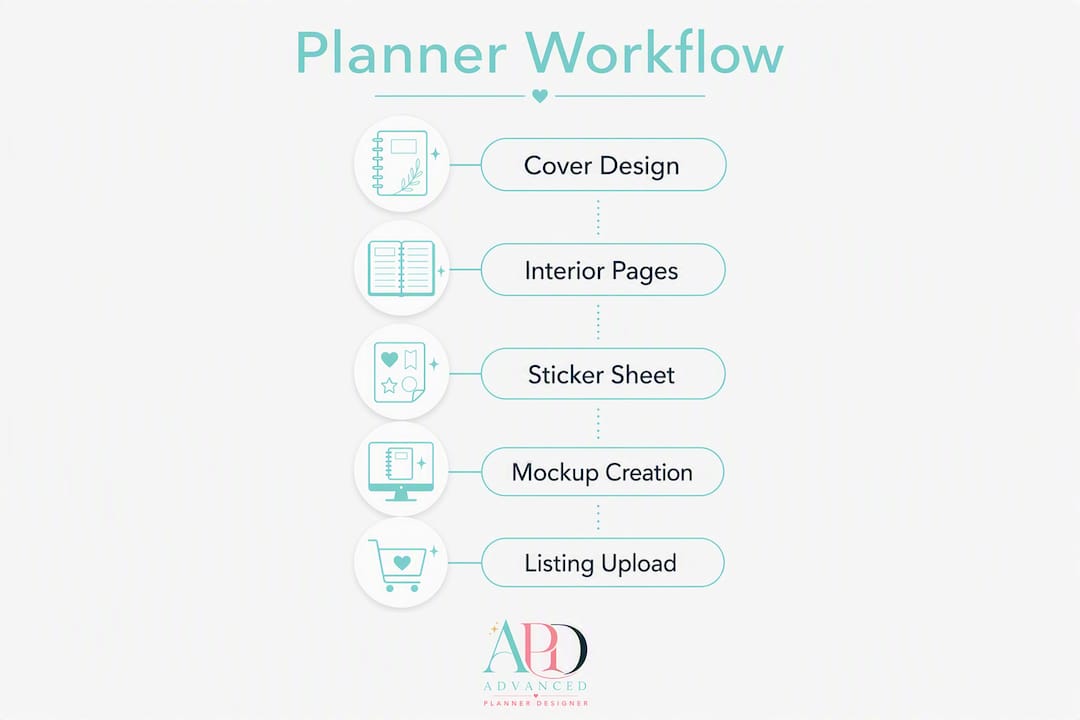
Here’s a realistic walkthrough using APD, with approximate times at each step.
Step 1: Cover (10–15 min). Open the cover generator, input your brand colours and style direction, and generate three options. Pick one and export as PDF and PNG.
Step 2: Interior pages (20–30 min). Use the interior builder to generate a 10–20 page layout. APD’s modules are built around planner dimensions, so margins and bleed are set correctly by default.
Step 3: Stickers (10–15 min). Generate a matching sticker sheet via the sticker generator. Export as PNG with a transparent background.
Step 4: Mockups (5–10 min). Feed your cover and interior exports into the mockup generator. Export three listing-ready mockup images.
Step 5: Listing export and upload (15–20 min). Export your final PDFs and PNGs, write your listing title and description, and upload to Etsy or Shopify.
Total: roughly 60–90 minutes for a complete, sellable kit.
A generic toolchain covering the same tasks (separate image generator, layout tool, mockup app, and listing image editor) typically takes 3–5 hours for the same output, and that’s before accounting for format mismatches and manual corrections.
APD’s features that directly cut post-generation editing:
- Design-system imports keep colours and fonts consistent across every page.
- 1-click mockups remove the need for a separate mockup app.
- Layered exports let you make targeted edits without starting over.
- Listing-ready templates match Etsy’s and Shopify’s image dimension requirements.
The platform’s AI planner generator has been used by over 10,000 creators to generate more than one million products, which reflects a workflow that scales reliably across different niches and styles.
Costs, GST and commercial-use checks for Australian creators
| Tier | Model | Expected AUD range |
|---|---|---|
| Starter/trial | Free or coin-based | AU$0–AU$15 |
| Basic creator | Monthly subscription | AU$15–AU$30/month |
| Pro creator | Monthly subscription | AU$30–AU$60+/month |
Ranges are indicative. Check APD pricing for current plan details.
GST note. If you sell digital goods through Etsy or Shopify as an Australian seller and your turnover exceeds the GST registration threshold, you may need to register for and remit GST. Etsy collects and remits GST on sales to Australian buyers under the marketplace facilitator rules, but your own obligations depend on your business structure and turnover. Confirm your position with a registered tax agent or the ATO.
Marketplace fees. Etsy charges a listing fee and a transaction fee per sale. Shopify charges a monthly platform fee plus payment processing. Factor both into your pricing before you set a retail price.
Commercial-use licence checklist:
- Confirm the tool’s terms explicitly permit commercial resale of AI-generated outputs.
- Check whether attribution to the tool is required in your listings.
- Retain your source prompts and any brand inputs used to generate each asset.
- Save a copy of the licence terms as they stood when you generated the asset, in case terms change later.
- For Australian creators, note that AI-generated works currently have limited copyright protection under Australian law. Your own creative inputs (brand assets, prompt authorship, curation) strengthen your claim to the final product.
10-step checklist: from idea to live Etsy listing
- Define size and format (5 min). Choose A4, US Letter, or a custom size. Confirm whether you’re selling a print-at-home PDF, a digital GoodNotes file, or both.
- Import brand assets (10 min). Upload your colour palette, font files, and any logo elements into your chosen tool.
- Generate cover concepts (15 min). Produce three directions and select one.
- Build interior pages (20–30 min). Generate a 10–20 page layout. Check text at 100% scale before exporting.
- Export PDFs and PNGs (10 min). Export at 300 dpi with bleed for print-ready files.
- Create mockups (10 min). Generate three mockup images showing the product in a realistic setting.
- Write listing title and description (15 min). Use exact phrases buyers search for: “A4 weekly planner PDF,” “printable journal pages,” “GoodNotes planner 2026.” Keep the title under 140 characters.
- Set pricing (5 min). Factor in Etsy fees, GST obligations, and your time. A typical printable planner on Etsy sells in the AU$5–AU$20 range.
- Upload with tags (10 min). Add 13 Etsy tags using specific phrases: “digital planner,” “printable weekly planner,” “A4 planner PDF.” Choose the correct category (Paper & Party Supplies > Stationery).
- Publish or schedule (5 min). Set your listing live or schedule it for a peak browsing time (Tuesday–Thursday mornings tend to perform well for digital products).
Total session time: 2–4 hours for a complete, listed product.
Listing SEO basics: Use the exact phrase a buyer would type in your title, not a creative description. “Printable A4 weekly planner PDF” outperforms “Your Perfect Week Companion” every time. Repeat your top two phrases in the description’s first two sentences, where Etsy’s search algorithm weights them most heavily.
Key takeaways
The fastest path to a sellable planner listing is a specialist platform that handles covers, interiors, mockups and listing images in one workflow, not a generic AI tool patched together with separate apps.
| Point | Details |
|---|---|
| Match tool to task | Use a specialist planner builder for layouts and mockups; use a vector editor for logos and brand assets. |
| Set design system first | Lock in hex codes, fonts and page size before generating anything to avoid inconsistent interiors. |
| Check text at 100% scale | Text-heavy layouts expose rendering errors; always verify at print scale before exporting. |
| Verify commercial licence | Confirm resale is permitted, retain your prompts, and document licence terms at the time of generation. |
| Advanced Planner Designer | APD covers the full workflow (covers, interiors, stickers, mockups, listing exports) and has supported 10,000+ creators across 1M+ products. |
What I’ve learnt building tools for creators
The most common mistake I see is creators jumping straight into generation without a design system. They generate a beautiful cover, then build 20 interior pages that don’t match it because the fonts and spacing were never locked in. The fix is simple: spend 20 minutes documenting your brand tokens before you touch a generator.
The second mistake is assuming AI-generated text is print-ready. It often isn’t. Calendars, grids, and any layout with dense text need a 100% scale check before export. Skipping this step is the single biggest cause of rework I hear about from creators.
The third is skipping the licence check. “Free to use” doesn’t mean “free to sell.” Read the commercial-use terms before you list, not after a buyer flags an issue.
My advice for scaling: don’t add more tools, add more design systems. Build one master system per niche (wellness planner, business planner, kids’ journal) and reuse it across every product in that range. Speed comes from reuse, not from generating everything from scratch each time.
Ready to create your first sellable planner kit?
If you want to go from idea to listed product without piecing together five different apps, Advanced Planner Designer is built for exactly that. You get a cover generator, interior builder, sticker generator, and mockup generator in one place, with listing-ready exports at every step.

The fastest first test: import one brand asset, generate a cover, and produce three mockups. That single session shows you the full output quality before you spend a dollar. Check the pricing plans to find the tier that fits your volume, or start with a free trial and see how quickly a complete kit comes together.
Useful sources and further reading
- Figma’s State of the Designer — industry survey data on generative AI adoption and quality improvements among designers.
- HubSpot: I tested 8 AI tools for graphic design — journalist-led tool tests covering task-by-task strengths and text rendering accuracy.
- Claude Design by Anthropic — product page covering design-system import, editing controls and export formats.
- Claude Design: the complete guide (daily.dev) — practitioner guide on contextual design and feeding brand tokens for consistent outputs.
- Using Claude Design for PowerPoint (Syracuse University) — practical walkthrough of import and export capabilities.
- Mowgli AI — spec-driven design tool for mobile, web and desktop; useful context for understanding where specialist tools differ from printable-focused platforms.
- YouTube: text rendering warning for AI print layouts — practitioner demonstration of text rendering errors in dense AI-generated layouts.
- Advanced Planner Designer mockup generator — APD’s mockup module and platform capability overview.
- Advanced Planner Designer home — platform overview, creator stats and product range.